
Download Icon Craft – create icons, icon designer, icon maker, desktop customization, customize icons, icon editor, icon tool, icon generator, icon creation, icon maker for Windows
Overview
Icon Craft is a dedicated tool designed for users seeking to personalize their Windows desktop environments through custom icon creation. The app addresses the common frustration of generic, uninspired icons by offering a streamlined platform to design, modify, and export unique visual elements. Targeted primarily at creative individuals, digital artists, and tech-savvy users who value aesthetic control, Icon Craft empowers users to transform standard icons into personalized expressions of style. Whether enhancing file shortcuts, redesigning desktop folders, or creating animated cursors, the app provides a focused solution for desktop customization.
The developer, Icon Craft, has positioned the application as a utility within the productivity category, emphasizing ease of use and creative freedom. Although specific background details about the developer are not available, the app’s longevity—first released in 2015—suggests a stable and maintained tool within its niche. Real-world use cases include branding personal devices, preparing custom software interfaces, and enhancing user experience through visual consistency. In the broader app ecosystem, Icon Craft fills a specialized gap by offering a lightweight, focused alternative to complex graphic design suites, making icon creation accessible to users without advanced design skills.
Key Features & Functionality
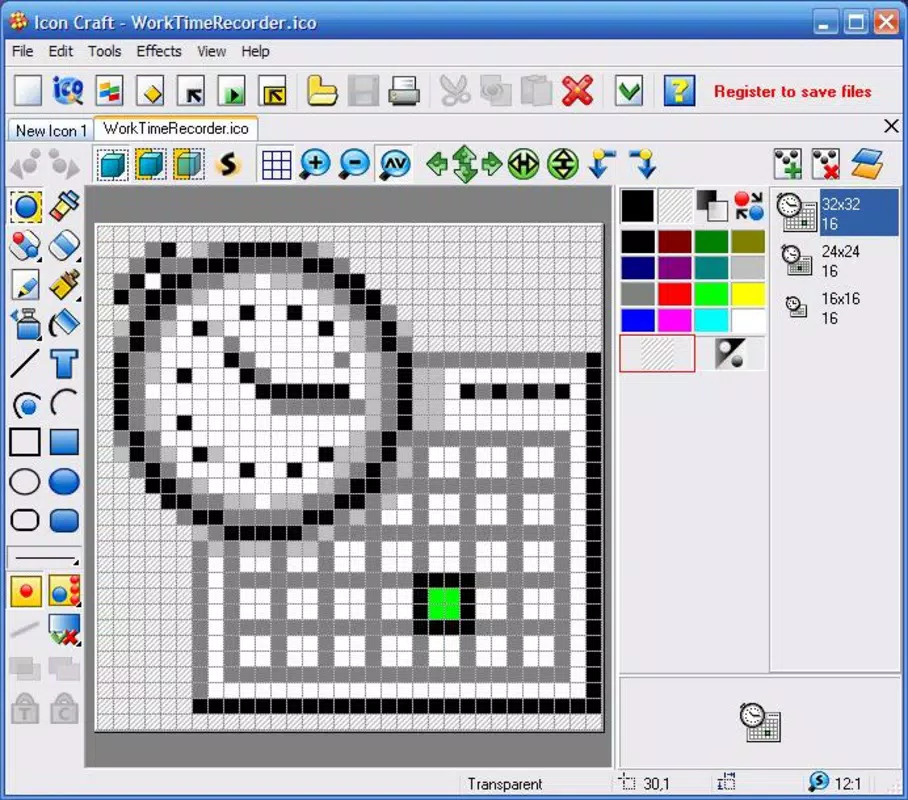
- Intuitive Interface: The app features a clean, user-friendly layout that minimizes learning curves. New users can begin designing icons immediately, with clearly labeled tools and a logical workflow that guides through each step.
- Flexible Creation Methods: Users can either start from scratch or import existing images to modify. This dual approach supports both original design and customization, allowing for creative adaptation of existing visuals.
- Multi-Format Support: Icon Craft handles a range of file types including ICO, BMP, JPEG, and others. This compatibility ensures seamless integration with Windows systems and ease of sharing across different platforms.
- Advanced Editing Tools: The software includes features for adjusting sharpness, opacity, lightness, and saturation. These tools allow for fine-tuned control over visual appearance, enabling users to match icons to their desired mood or theme.
- Cursor Design Capabilities: Beyond icons, the app supports the creation and editing of static and animated cursors, specifically tailored for Windows XP. This feature enhances desktop consistency by extending customization to interactive elements.
For example, a user might take a simple image of a book and convert it into a high-resolution, transparent ICO file with subtle shadows and color adjustments—ideal for a personal document folder. Another user could animate a cursor to match a retro gaming theme, applying frame-by-frame edits within the app’s interface. These practical applications demonstrate how Icon Craft turns basic ideas into polished, functional desktop assets.
Interface, UX & Performance
Icon Craft presents a minimalist interface focused on core functionality, avoiding clutter while maintaining accessibility. The layout is organized around a central workspace, with toolbars and preview panels arranged for efficient workflow. Navigation is straightforward, relying on intuitive menus and context-sensitive options that respond to user actions. The visual style is functional rather than flashy, prioritizing clarity and usability over decorative elements.
Although the developer did not list formal performance metrics, the app’s file size of 12.7 MB suggests a lightweight footprint, which typically correlates with fast loading times and minimal system resource usage. The app is expected to run smoothly on a range of Windows devices, from older systems to modern machines. Responsiveness appears consistent across common tasks such as image import, layer editing, and format conversion. Stability is implied by the app’s long-standing presence since 2015, indicating reliable operation over time. However, specific compatibility with newer Windows versions beyond XP was not disclosed, so users should verify functionality on their target systems.
Platform Compatibility & Technical Requirements
Icon Craft is designed for the Windows platform and requires a compatible Windows operating system. The app’s current version is 2.0.2, with a file size of 12.7 MB. While the developer did not specify minimum OS requirements, the app’s release date of 2015 and support for Windows XP suggest it may function on older systems. However, compatibility with newer Windows versions such as Windows 10 or 11 has not been confirmed. Users are advised to check system specifications before installation.
The app does not appear to be available on mobile platforms, as it is explicitly designed for desktop environments. No additional technical requirements, such as GPU acceleration or specific hardware, were listed. The absence of such details indicates the tool is optimized for general-purpose computing environments. For users seeking a desktop-only solution, Icon Craft offers a focused experience without the overhead of mobile-specific features.
Pros and Cons
Pros
- Simple, intuitive interface ideal for beginners and casual users
- Supports multiple file formats for flexible import and export
- Enables creation of both icons and animated cursors
- Lightweight design with minimal system resource usage
- Offers advanced editing tools for refined visual control
Cons
- Developer did not provide detailed compatibility information for modern Windows versions
- Specific requirements for RAM, processor, or storage were not listed
- App is not available on mobile platforms or alternative operating systems
- No cloud sync or collaborative features were mentioned
- Price point may be considered high for a niche tool without frequent updates
FAQ
Is Icon Craft safe to download and install?
Yes, the app is available through official channels and has been in use since 2015. Users should ensure they download from trusted sources to avoid unauthorized modifications.
Can I use Icon Craft on Windows 10 or Windows 11?
The developer did not confirm compatibility with Windows 10 or 11. While the app may function on these systems, it is recommended to test it on your device before full deployment.
Does Icon Craft support animated icons?
Yes, the app allows users to create animated cursors, which are a form of animated visual elements. While dedicated animated icon support is not explicitly mentioned, the cursor creation tools suggest some level of animation capability.
Is there a free version of Icon Craft?
No, the app is a paid tool with a price of $19.95. There is no free trial or freemium version currently available.
How often is Icon Craft updated?
The last version released was in 2015. The developer has not provided information on update frequency, so users should expect limited or no future updates.
Final Thoughts
Icon Craft remains a reliable, focused tool for users who value personalized desktop experiences on Windows. Its intuitive design, multi-format support, and cursor creation features make it a practical choice for both beginners and experienced users seeking to elevate their digital environment. While the app’s age and lack of recent updates may raise concerns about modern compatibility, its lightweight nature and clear functionality continue to serve its core audience. For individuals passionate about visual customization and desktop aesthetics, Icon Craft offers a straightforward, effective solution without unnecessary complexity.
Download Icon Craft now


